


Token Transit
4.31.20K Reviews
App Specs
- Version
- 4.8.0
- Updated On
- License
- Free
- Downloads
- 1,000,000+
- Developer
- Token Transit, Inc.
- Categories
- Travel & Local
- Platform
- Android, iOS
Screenshots
 Analysis by AppCompare
I judge a transit ticketing app less by how polished its screens look than by what happens when a bus is approaching and I need to pay quickly. Token Transit is built around that practical moment: it lets riders purchase transit passes on a phone instead of relying on cash or a paper ticket. It is a focused travel app from Token Transit, Inc., rather than a general trip-planning tool, and that distinction matters when deciding whether it belongs on your phone.
Its usefulness depends on the transit service you ride. A digital pass can make boarding simpler, but it only replaces your usual payment method where your agency supports the app and the pass you need is available there. I would check that before depending on it for a commute or a time-sensitive connection. For riders whose local service is covered, the strongest case is straightforward: buy ahead, keep a pass on your phone, and avoid having to find cash at the last minute.
Seamless Ticketing Experience
First things first, let’s talk about the setup. After downloading Token Transit from the app store, the registration process is as smooth as it gets. You just enter your phone number, get a verification code, and voilà, you’re in! No unnecessary frills, just straight to the point. It’s refreshing to see an app that doesn’t bog you down with endless forms or unnecessary details.
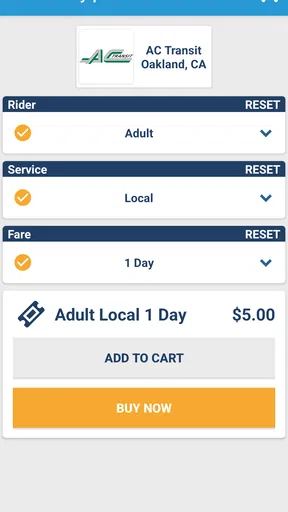
Now, onto the main event: buying tickets. The app supports a wide array of transit agencies, which is a real game-changer. Once you select your city, buying a ticket is just a couple of taps away. It’s like having a digital wallet specifically for your bus rides. No more scrambling for exact change or worrying whether you have enough cash on hand.
Interactive Features and Design
One of my favorite things about Token Transit is its user-friendly design. The interface is clean and intuitive, making navigation a breeze. Even if you’re not the most tech-savvy person, you’ll find it easy to get around. Everything is laid out logically, and the color scheme is easy on the eyes.
The app also does a fantastic job of keeping you informed. It sends timely notifications about your ticket status, expiration, and promotions available. These small touches make a big difference, especially when you’re on the go and need quick access to your information.
Convenience on the Go
Let’s not forget about the convenience factor. One aspect that’s truly impressive is the ability to buy tickets in advance. You don’t have to worry about getting stuck without a ticket during peak hours. Plus, if you’re traveling with friends or family, you can purchase multiple tickets at once. It’s all about making life easier, and Token Transit nails it in this department.
Worth Reading Before You Choose

EA SPORTS FC Mobile 26 Is a Bigger Football Game, but It Takes Time

Flipboard Shows What News Apps Must Do Beyond the Feed

Switching to Android Auto Means Rethinking Your Driving Routine

Google Calendar Makes a Crowded Week Easier to Manage

Ludo King Makes the Most of the Minutes Between Plans

Baby Panda World Brings Quick Play to Modern Phones, but Its Game Library Feels Busy
Another cool feature is the ability to send tickets. Need to help out a friend or family member? Just send a ticket to their phone number through the app. It’s these thoughtful features that make the app feel like it was designed with real-world scenarios in mind.
Practical Trade-Offs for Regular Riders
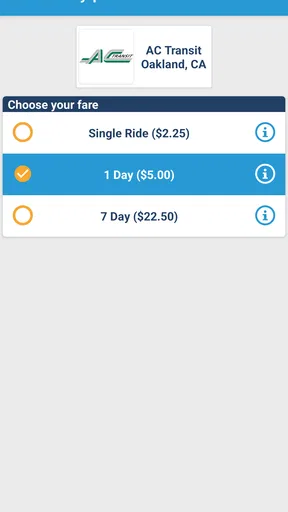
The smoothest routine is to choose your city and review the available pass types before you are standing at the stop. I would do that while connected to reliable internet, then purchase the pass I actually expect to use. Buying early can reduce pressure, but it is worth checking when a pass becomes active and how long it remains valid; a pass bought ahead is not automatically the right choice if its validity starts before your trip.
For a weekly commute, the useful question is not simply whether a ticket is available, but whether the available pass matches how you travel. If you ride only occasionally, a single ride may suit you better than paying for a larger pass. If you travel repeatedly, compare the options shown for your agency with the fare product you normally buy. I would not assume the app offers every fare or that the same pass rules apply in every city.
Multiple tickets can make a family outing easier, but I would plan how each person will present their fare before boarding. Buying several passes in one place is convenient for organizing a group; it does not mean every traveler should expect the same screen or phone to serve as a separate ticket device. When helping someone else, sending a ticket can be more practical, especially if that person needs to carry and show their own pass. Confirm the recipient’s number carefully before sending, since a small input mistake can turn a quick favor into a boarding-day problem.
When a Phone Ticket Helps—and When It Does Not
A realistic use case is a last-minute trip across town after work. I can check the options for my local service before leaving, buy the appropriate pass while I have a connection, and have the ticket ready when I reach the stop. That avoids searching for a cash machine or holding up the line to sort out payment. It is particularly useful when I already know which service I am taking and want to handle the fare separately from route research.
That separation is also the main comparison with common alternatives. A transit agency’s own app may combine fares with route information or service alerts, while a navigation app is generally better for comparing ways to reach a destination. Cash and paper tickets remain useful when I do not want to rely on a phone or when a particular agency’s fare arrangements make them simpler. Token Transit is most compelling when the local agency offers the pass I need and I value a dedicated, phone-based purchase flow; it is not a universal replacement for every transit app or payment method.
I would also keep a fallback in mind for a dead battery, a damaged phone, or a weak connection at the point I need to access a ticket. Buying in advance can reduce dependence on a rushed purchase at the stop, but it cannot make a phone usable when the device itself is unavailable. Riders who regularly travel with a nearly empty battery, or who prefer not to manage tickets digitally, may be better served by the agency’s other accepted payment option.
Security and Reliability
Of course, with any app handling payments, security is a top concern. Rest assured, Token Transit takes this seriously. All transactions are encrypted, and the app doesn’t store any payment details directly. It’s all done through a secure payment gateway, giving you peace of mind while you use it.
Reliability is another key factor, and I found the app to be consistently stable during my use. There were no crashes or hiccups, which is crucial when you’re trying to catch a bus on time. It’s clear the developers have focused on creating a robust and reliable platform.
My practical advice is to avoid making the first purchase in the few seconds before boarding. Install the app, select the service you use, and get familiar with its pass choices while you have time to read them. That small bit of preparation is more valuable than assuming any ticketing app will work exactly like another: fare names, activation timing, and accepted payment methods can differ by agency. If something looks unclear, pause and check the pass details rather than buying on guesswork.
What the Current Version Means for Riders
The app is currently at version 4.7.6, following its initial release on December 9, 2016. That history shows it has been available for years, while the version number identifies the current build; neither fact by itself tells me what changed in a particular update. I would treat the app as an established ticketing option, not assume that a recent release introduced a specific feature or that every local transit network works the same way.
For existing users, the most important test is whether the current app continues to show the right agency and pass for their regular journeys. After an update, I would check that I can still sign in and find my usual fare before relying on it for an important trip. New riders should do the same sort of check once, in a calm moment: confirm local availability, inspect the ticket choices, and understand how the pass is presented before heading out.
The app is free to install and is rated for Everyone. It has an average rating of 4.3 from around 3.2 thousand ratings, with roughly 1.2 thousand written reviews, and has passed a million installs. Those figures suggest it has attracted a substantial group of riders, but they do not guarantee that it will fit your local system. Its minimum Android requirement is version 5.0, so device compatibility is another straightforward check for Android users before planning a trip around it.
Final Thoughts
In a world that’s increasingly digital, Token Transit is a breath of fresh air for public transit users. It simplifies the ticketing process, offers great convenience, and keeps everything secure. If you’re someone who relies on public transport, this app is definitely worth a download.
Whether you’re a daily commuter or an occasional rider, the app offers something for everyone. So, next time you’re waiting at the bus stop, why not give Token Transit a try? You might just find it’s the ticket to a smoother ride.
My recommendation is a little more specific: try it if your regular agency is supported, the fares suit your trips, and you are comfortable carrying tickets on your phone. I would skip it as a primary option if you need one app to plan every leg of a journey, if your local service is not available, or if a paper fare is more dependable for your routine. Before making it your everyday habit, I would also watch how clearly the app communicates ticket validity and local fare choices in the version you use. The best digital ticket is the one that fits the rules of your route and is ready when you need it.
Pros
- User-friendly interface for quick navigation.
- Supports multiple transit agencies smoothly.
- Easy payment options with saved cards.
- Real-time updates on transit schedules.
- Eco-friendly paperless ticketing system.
Cons
- Limited coverage in rural areas.
- Occasional app crashes reported.
- Requires stable internet for updates.
- No offline mode for ticket access.
- Limited customer support availability.
FAQs for Token Transit
What is Token Transit and how does it work?
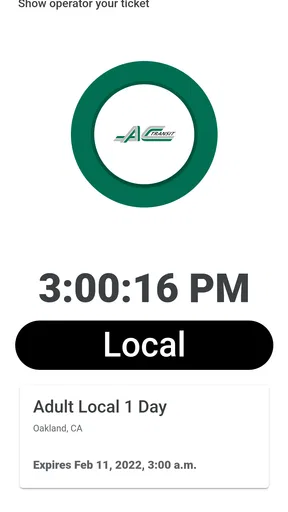
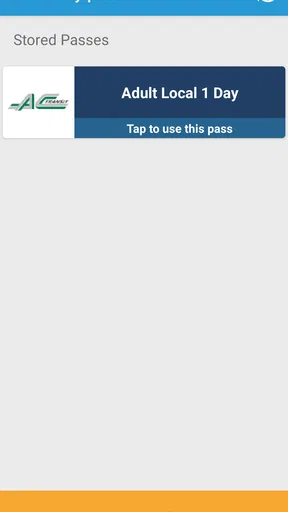
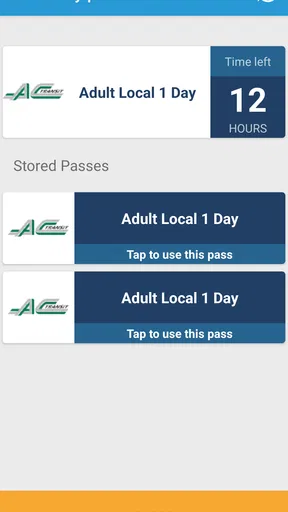
Token Transit is a mobile app designed to make public transportation more convenient by allowing users to purchase and use bus and transit passes directly from their smartphones. Once you buy a pass, it's stored on your phone and can be activated when you're ready to travel. Just show the digital pass to the driver when boarding.
Is Token Transit available in my city?
Token Transit partners with various transit agencies across the United States and Canada. To check if your city is supported, visit the Token Transit website or open the app and search for your local transit agency. The app will list all participating locations where you can use its services.
How secure is my payment information with Token Transit?
Token Transit ensures your payment information is secure by using industry-standard encryption and secure payment processors. Your financial data is never stored on your device or shared with transit agencies. Always ensure you're using the latest version of the app to benefit from the latest security updates.
Can I use Token Transit without an internet connection?
While Token Transit requires an internet connection to purchase and download passes, you can activate and display a previously downloaded pass without being connected. However, ensuring your app is updated and passes are downloaded before losing connectivity is a good practice.
What if I encounter an issue using my pass on the bus?
If you face any issues using your Token Transit pass, you can contact their customer support via the app or website for assistance. It's helpful to have details of the issue ready, such as the time, date, and bus route, to expedite the resolution process.


